This is a Mapping and Messaging application to go with the APRS Digi/Igate function of BPQ32.
QtBPQAPRS is a more modern crossplatform version of this software.
APRS® is a registered trademark of Bob Bruninga.
Includes code from libpng
libpng version 1.2.8 - December 3, 2004
Copyright (c) 1998-2004 Glenn Randers-Pehrson
Copyright (c) 1996-1997 Andreas Dilger
Copyright (c) 1995-1996 Guy Eric Schalnat, Group 42, Inc.
Includes code from Zlib
This software is based in part on the work of the Independent JPEG Group.
Mapping from OpenStreetMap
Map Tiles Courtesy of Thunderforest
www.thunderforest.com
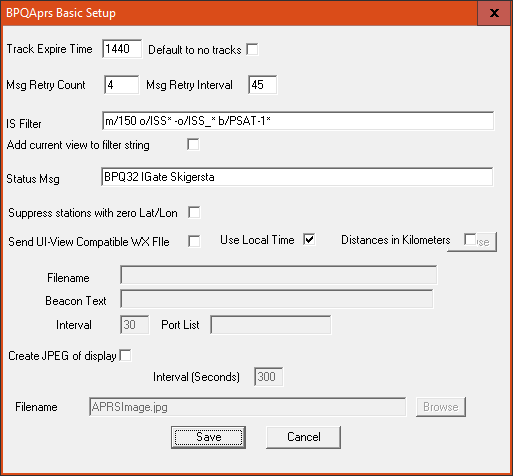
The "Basic Setup" option allows you to:
Set the time before inactive stations are deleted
Set the retry time and count for messaging
Set whether to display tracks for moving stations
Set the filter string for the APRS-IS Server connections, and whether to add the current map display area to the filter.
Set the Status Message to send
Choose whether to display stations with a lat and lon of zero
Set whether to use local time or UTC
Set whether to display distances in miles or kilometres
A good filter to start with might be "m/50 u/APBPQ*"
This will show all stations within 50Km of you, and all stations running the BPQ32 Igate. See
here for details of all the filter options.
You can also send WX files which have been created in the format expected by UI-View32, eg
Jan 29 2012 22:34
090/000g005t037r000P000p000h89b10267
You need to specify the name of the file, text to add to the WX Message (if required), time between WX messages (minutes), and the port(s) to send the message on. If you want to send the WX message to APRS-IS, include IS in the list of ports.
You can generate a .jpg image of the current APRS Map display at regular intervals. This could be used, for example, to show your local activity on a web site.
Drag map to move. Zoom in and out using mouse wheel, Zoom In/Out Menu or + - keys. You can also use = instead of +
Double click on station in station list to centre map on the station.
Double click on a Call in Messages list or Map Popup to transfer it to the TO station dropdown list.
Right Click on fields in Messaging Window to copy text to clipboard
Right Click on callsign in Station popup on Map display to copy to clipboard, Enable tracks or set track colour.
There are additional functions under the "Actions" Menu:
Home - centre Map on your location
Send Beacon
Set Filter to Current View - includes the area currently displayed in the APRS-IS Filter.
The Web server is configured in a similar way to the UI-View web server, although there are minor differences.
The "Base Directory" for pages and files is folder BPQAPRS/HTML, under your BPQ32 Data Directory.
The simplest way to get it working is to take a set of pages, and tailor them to your
requirements. A typical set may be downloaded from here.
These were provided by Ken KD6PGI, but I have changed them a bit, so any errors are mine, not his.
A list of tokens that can be used with APRS Web pages can be found here.