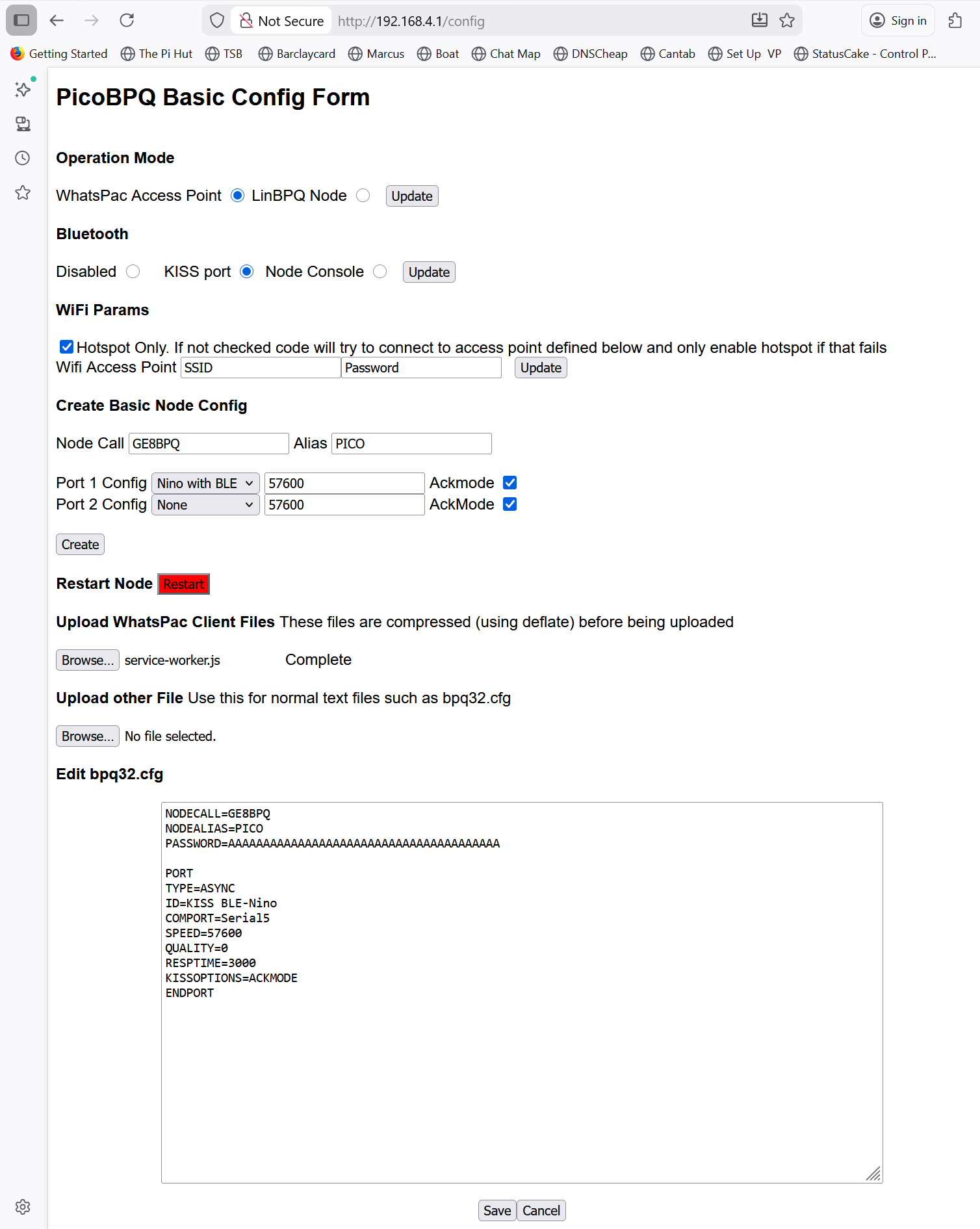
This is an updated version of the RP2040 version of LinBPQ. It includes wifi support and RHP and is intended to create a wifi hotspot for use with a NinoTNC to form a standalone inteface butween a radio and a tablet or phone running WhatsPac. It can host the WhatsPac web client files as well as the RHP interface. There is a web based configuration page to allow configuration of the LinBPQ software and uploading the WhatsPac client files. This can be accessed at url /config. If using hotspot mode it will be http://192.168.4.1/config
PicoBPQ has two operation modes, WhatsApp Access Point and LinBPQ Node. There is acually little difference between them -
the WhatsApp interface is available in LinBPQ mode and the Access Point has can use all the Node feature. The main difference is the default html
page (WhatsPac in Access Point Mode and Config page in Node mode). Some default config params are also different.
Pretty much self explanitory. As the code in primarily intended for standalone operation Access Point Mode is likely to be more useful, but you can set it up
to connect to your lan if necessary.
Again pretty obvious. The bluetooth serial port can be used as an ax.25 KISS port or to access the node console. Note that the Pico Serial over BT code
only works in slave mode so you can't connnect two copies together over BT.
Will create a minimal bpq32.cfg. Options for Port are "Nino With BLE (Nino TNC connected via BLE board, actually sets port to Serial5), Serial1 or BTSerial.
Resets Pico to restart the Node
Opens a dialog to select a file to upload. The file will be compressed using deflate. At the moment the client files are only available on the WhatsPac website. Hopefully
they will at some point be provided as a zip download. The following script can be used to download the files
wget -N http://whatspac.oarc.uk/index.html
wget -N http://whatspac.oarc.uk/service-worker.js
wget -N http://whatspac.oarc.uk/favicon.png
wget -N http://whatspac.oarc.uk/assets/index.js
wget -N http://whatspac.oarc.uk/assets/index.css
wget -N http://whatspac.oarc.uk/assets/addHopAbove.png
wget -N http://whatspac.oarc.uk/assets/addHopBelow.png
Some files, expecially index.js will take a long time to upload.
Used to upload other files that shouldn't be compressed
Allows editing of bpq32.cfg. If there isn't an existing file then a default config, suitable for using a Nino TNC with BLE board.
Once you have uploaded the WhatsPac client files you can access WhatsPac at the Pico home page, eg http://192.168.4.1
In "Your Packet Setup" select "I run BPQ and will configure it manually"
In "BPQ Node Endpoint" set hostname to the IP address of the Pico. If running in HotSpot mode this will be 192.168.4.1. Set "Rest API Port" to 80 and "RHP Port" to 81.
As the client and host are on the same machine there are no problems with CORS on Chrome
In the connect script, if you only have one radio port defined the first connect can be to your nearby node. If you have more than one then the first connect must be to SWITCH.